# Welcome to SharDex

<figure><img src="https://1005363362-files.gitbook.io/~/files/v0/b/gitbook-x-prod.appspot.com/o/spaces%2FQqjd2AKYKqYSU7Mqeuqg%2Fuploads%2FL2kWT6CwkMqCf13rrVE6%2FMicrosoftTeams-image%20(229).png?alt=media&amp;token=792edcfd-669c-44ab-9093-c9733ee6f799" alt=""><figcaption><p>SharDex</p></figcaption></figure>

**SharDex** is a brand-new decentralized trading platform launched on the Shardeum blockchain that aims to provide users with the best on-chain asset trading experience.&#x20;

It provides a group of asset management solutions, including Bridge, Swap, NFT Marketplace, Launchpad, DAO etc. These functions help users transfer assets from other chains to Shardeum and exchanged them for other assets with an easy-to-use, secure and affordable path.


# Our Mission

:smile: **Our Mission** is simple. To provide a place where people can Buy & Sell with the best experience. And we will try to make a secure and easy-to-use product.&#x20;

:tada:Last but not least, we want to make it accessible to everyone.

**Our VISION** is of course to be one of the core protocols in the Shardeum ecosystem, and eventually to be seamlessly connected across the whole network of blockchains.


# Roadmap

:clap:<mark style="color:red;">**We would also be happy to share our roadmap with you.**</mark>

### **Phase 1-Glimmer**

· Testnet Launch

· Internal Testing Phase

### **Phase 2-Rosy Dawn**

· Public Testing Phase

· Waitlist Activities

### **Phase 3-Sunshine**

· Airdrop

· Swap

· Staking & Earn

· NFT Marketplace

### Phase 4-Halo

· DAO

· GameFi

· Launchpad

*More information regarding our tokenomics and token distribution will be released soon.*


# How to Claim SharDex Airdrops

This is a detailed tutorial for getting airdrops. Check Now!

<figure><img src="https://1005363362-files.gitbook.io/~/files/v0/b/gitbook-x-prod.appspot.com/o/spaces%2FQqjd2AKYKqYSU7Mqeuqg%2Fuploads%2F3i8f0CbuaTHbw8Mz99Go%2Fairdrop.jpg?alt=media&amp;token=206be81e-92c4-43ea-a9e3-234bb1759667" alt=""><figcaption></figcaption></figure>

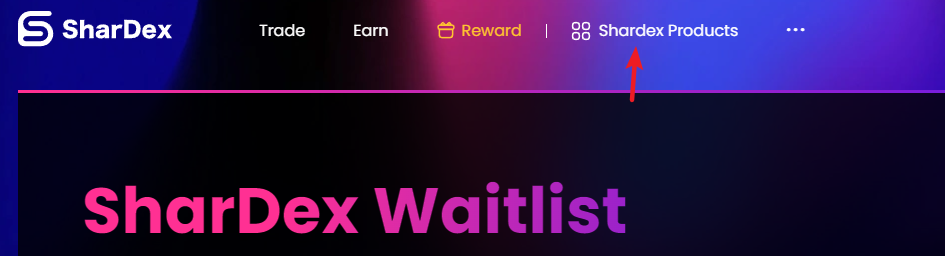
1. Enter the SharDex homepage - Click **\[Reward]** on the navigation bar in the upper right corner of the page

<figure><img src="https://lh4.googleusercontent.com/LJdM96CrBu6ibMwuna4CqKCuKqHm3jHR6MHljwz0silcPRnuWUPr7NqcWLYJpUu6uxkWWopB3gNDPce2WJHcMypDYfdrtHLIM5UpaWVNnJJFpESPYfXtb3WVC2-f2CQbZdXano35gE9KdXRiqySAytMBPV5_8gy4BkyxokTiyIR3Y2KJUb6GXnO3v6b_6A" alt=""><figcaption></figcaption></figure>

2\. 【**SharDex Waitlist**】 is the point system of SharDex. Successfully referring 3 friends can allow user to claim Soul Bound Token, and join the SharDex NFT Waitlist for Genesis Airdrop. It only takes two steps to get rewards.

**Step 1** --Binding your social accounts to claim **SBT,** which may later become an admission ticket for **IDO.**

<figure><img src="https://1005363362-files.gitbook.io/~/files/v0/b/gitbook-x-prod.appspot.com/o/spaces%2FQqjd2AKYKqYSU7Mqeuqg%2Fuploads%2FIfJVBZtP6qZijgZAUMPs%2Fimage.png?alt=media&amp;token=256ed2b6-6cee-4f1b-b00d-f983e7a376b0" alt=""><figcaption><p>SBT</p></figcaption></figure>

Click **\[Invite to earn more points]** to invite your friends. For each confirmed referral, both your friend and you will get Share Points.

<figure><img src="https://1005363362-files.gitbook.io/~/files/v0/b/gitbook-x-prod.appspot.com/o/spaces%2FQqjd2AKYKqYSU7Mqeuqg%2Fuploads%2F82PYUVAlY7PWt4hVNP7x%2Fimage.png?alt=media&amp;token=5dcb104d-9a51-4886-b372-b1595f3aa462" alt=""><figcaption><p>copy</p></figcaption></figure>

Once you refer **three valid users**, SharDex will automatically send SBT to your addres&#x73;**.**（If you have any questions, please contact us on[ Discord](https://discord.gg/TWzDNx6EYR)）

<figure><img src="https://1005363362-files.gitbook.io/~/files/v0/b/gitbook-x-prod.appspot.com/o/spaces%2FQqjd2AKYKqYSU7Mqeuqg%2Fuploads%2FIWhMMoMEMNLN5K7w2stA%2Fimage.png?alt=media&amp;token=25db3499-803b-4c53-ad02-0cba08fc5ede" alt=""><figcaption><p>rewards</p></figcaption></figure>

**Step 2--**&#x52;anked the top on the share points leaderboard to boost your airdrop rewards

<figure><img src="https://1005363362-files.gitbook.io/~/files/v0/b/gitbook-x-prod.appspot.com/o/spaces%2FQqjd2AKYKqYSU7Mqeuqg%2Fuploads%2FhyLKV7HEYfmp1QKdr7xO%2Fimage.png?alt=media&amp;token=5878c11e-e595-4a97-ac7f-9d7fd9efa3d8" alt=""><figcaption><p>Step2</p></figcaption></figure>

Click **\[Invite to earn more points]** to invite your friends. The more friends you invite, the more airdrops you get !

<figure><img src="https://1005363362-files.gitbook.io/~/files/v0/b/gitbook-x-prod.appspot.com/o/spaces%2FQqjd2AKYKqYSU7Mqeuqg%2Fuploads%2FEzqWneyVYRRWNDRqgMHa%2Fimage.png?alt=media&amp;token=bf6af962-68e9-48a6-879d-79c15d873eba" alt=""><figcaption></figcaption></figure>

***Notes***

*1.Each address can only mint one **SBT**, and it is non-transferable.*

*2.The Share Points may impact the quality of the final airdrop.*


# Set Up Wallet on Shardeum Network

Adding Shardeum Network to MetaMask

<figure><img src="https://1005363362-files.gitbook.io/~/files/v0/b/gitbook-x-prod.appspot.com/o/spaces%2FQqjd2AKYKqYSU7Mqeuqg%2Fuploads%2FVRlWHZ0z0fbtFUSozdpP%2Fwallet.jpg?alt=media&amp;token=33461f75-79cb-4670-9163-4edfc0fec3cd" alt=""><figcaption></figcaption></figure>

### **Step1--Setup your Wallet**

Click [here](https://metamask.io/download/) to install the MetaMask extension on your browser. It can be installed on most desktop browsers. Just click on the installation button to begin the process. Once installed, continue to the next section to add the Shardeum network to your new wallet.

### **Step2--Add Shardeum Network**

#### 1.Open **MetaMask** and click the list of networks at the top, then select "Add Network".

<figure><img src="https://1005363362-files.gitbook.io/~/files/v0/b/gitbook-x-prod.appspot.com/o/spaces%2FQqjd2AKYKqYSU7Mqeuqg%2Fuploads%2FdTXV8vb8hegYeB4NUKPI%2Fimage.png?alt=media&amp;token=b05b5608-bf0f-4084-8a9a-ca1cfbbc11eb" alt=""><figcaption><p>add network</p></figcaption></figure>

#### **2. Input the endpoint information (copy from table below).**

**Liberty 1.X**[​](https://docs.shardeum.org/wallets/MetaMask/add-shardeum-network#liberty-1x)

| **Field**                     | **Alphanet**                               |
| ----------------------------- | ------------------------------------------ |
| Network Name                  | Shardeum Liberty 1.X                       |
| New RPC URL                   | <https://liberty10.shardeum.org/>          |
| Chain ID                      | 8080                                       |
| Currency symbol (optional)    | SHM                                        |
| Block Explorer URL (optional) | <https://explorer-liberty10.shardeum.org/> |

**Liberty 2.X**[​](https://docs.shardeum.org/wallets/MetaMask/add-shardeum-network#liberty-2x)

| **Field**                     | **Alphanet**                               |
| ----------------------------- | ------------------------------------------ |
| Network Name                  | Shardeum Liberty 2.X                       |
| New RPC URL                   | <https://liberty20.shardeum.org/>          |
| Chain ID                      | 8081                                       |
| Currency symbol (optional)    | SHM                                        |
| Block Explorer URL (optional) | <https://explorer-liberty20.shardeum.org/> |

#### 3.Click 【**Save**】after filling in the Shardeum network endpoint info inside Metamask.

### Step 3--Create Account

#### Click on the account icon on the top right of MetaMask to create a new account

<figure><img src="https://1005363362-files.gitbook.io/~/files/v0/b/gitbook-x-prod.appspot.com/o/spaces%2FQqjd2AKYKqYSU7Mqeuqg%2Fuploads%2Fkg0Qdy1ugIQKUlUfwq5u%2Fimage.png?alt=media&amp;token=181882c1-e60a-475f-a0f3-5d3dae3d40d4" alt=""><figcaption></figcaption></figure>

***Notes:***

*1.You can also quickly add networks using* [*https://chainlist.org/*](https://chainlist.org/)

*2.Shardeum Network is currently in the testing phase, please pay attention to the official news to update the network in real time*


# Connect Wallet to SharDex

<figure><img src="https://1005363362-files.gitbook.io/~/files/v0/b/gitbook-x-prod.appspot.com/o/spaces%2FQqjd2AKYKqYSU7Mqeuqg%2Fuploads%2Fs14h3ABkaJcrjocqeSRb%2Fconnect-wallet.jpg?alt=media&amp;token=d2230372-6f40-4ba0-acfe-3e000c147014" alt=""><figcaption></figcaption></figure>

Enter the SharDex [official website](https://testnet.shardex-interface.pages.dev/swap), and then click on th&#x65;**【Connect Wallet】**&#x6F;n the upper right corner. And you can complete the connection after interacting with Metamask.&#x20;

<figure><img src="https://1005363362-files.gitbook.io/~/files/v0/b/gitbook-x-prod.appspot.com/o/spaces%2FQqjd2AKYKqYSU7Mqeuqg%2Fuploads%2FyibDC1x1SZ7mOF5QPZfQ%2Fimage.png?alt=media&amp;token=d4a1e40a-c6b0-45e6-aa11-de4e5bade633" alt=""><figcaption><p>wallet</p></figcaption></figure>

<figure><img src="https://1005363362-files.gitbook.io/~/files/v0/b/gitbook-x-prod.appspot.com/o/spaces%2FQqjd2AKYKqYSU7Mqeuqg%2Fuploads%2FOIdQ57mz5pvCX8NlOiOH%2Fimage.png?alt=media&amp;token=d01e22e3-2850-4e9c-bb70-c9ba3e259714" alt=""><figcaption><p>wallet</p></figcaption></figure>

<figure><img src="https://1005363362-files.gitbook.io/~/files/v0/b/gitbook-x-prod.appspot.com/o/spaces%2FQqjd2AKYKqYSU7Mqeuqg%2Fuploads%2FSjFGSqyFuiSN3TGmFJiC%2Fimage.png?alt=media&amp;token=8b3c0f6e-d232-40f1-aa0b-9ff978989cd7" alt=""><figcaption><p>My Wallet</p></figcaption></figure>


# Let's Get Some $SHM

<figure><img src="https://1005363362-files.gitbook.io/~/files/v0/b/gitbook-x-prod.appspot.com/o/spaces%2FQqjd2AKYKqYSU7Mqeuqg%2Fuploads%2FM6LZkPldqmLeo393ubK4%2Fshm.jpg?alt=media&amp;token=d58e5b68-06c2-499d-830e-99ef4a076719" alt=""><figcaption><p>airdrops</p></figcaption></figure>

### Shardeum Faucet Website <a href="#shardeum-faucet-website" id="shardeum-faucet-website"></a>

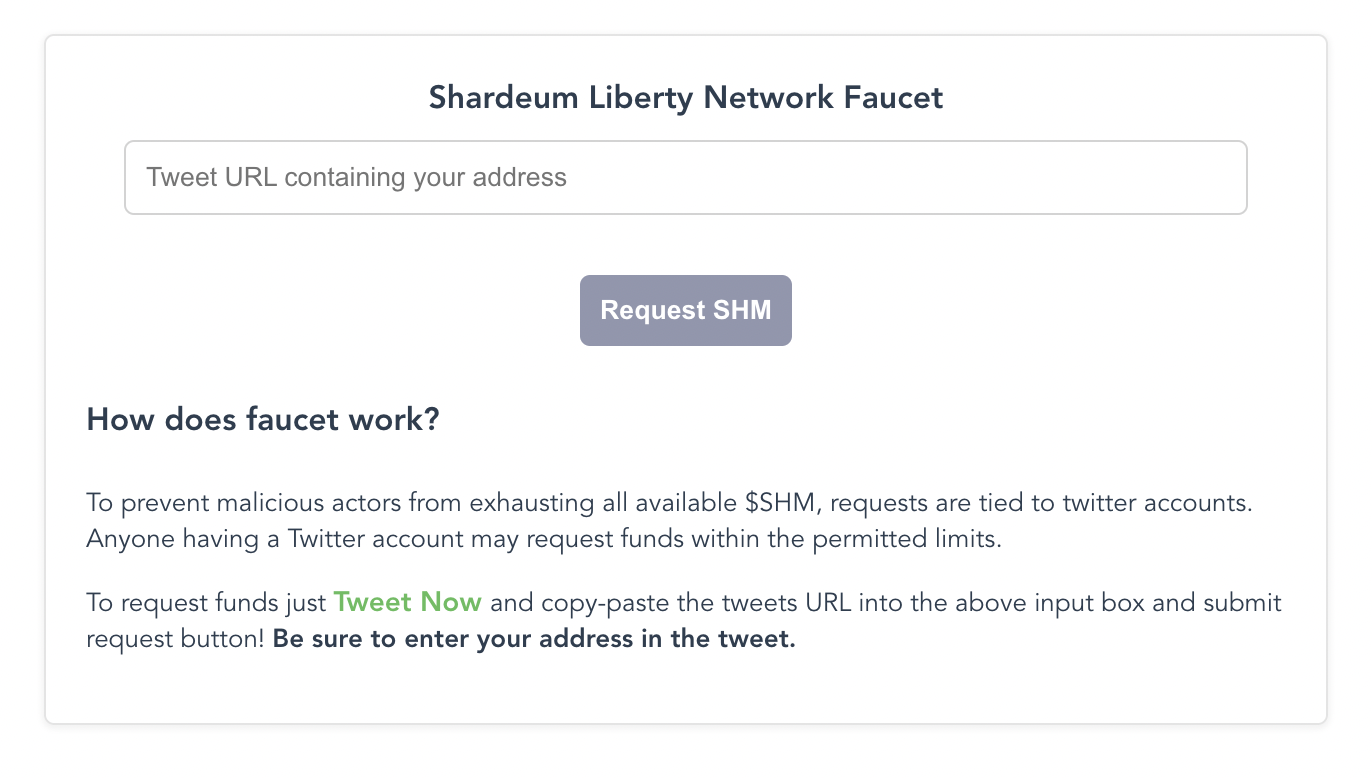
1. After adding the Shardeum Liberty network to  MetaMask, you can claim **100 testnet SHM** from Shardeum Liberty faucet. The SHM can then be used to deploy smart contracts and build dApps on Liberty.
2. Visit the Shardeum Liberty faucet:

   Liberty 1.X:

   <https://faucet.liberty10.shardeum.org/>

   Liberty 2.X:

   <https://faucet.liberty20.shardeum.org/>

<figure><img src="https://1005363362-files.gitbook.io/~/files/v0/b/gitbook-x-prod.appspot.com/o/spaces%2FQqjd2AKYKqYSU7Mqeuqg%2Fuploads%2FqYAaDAw8AiVxH6ouQtrJ%2Fimage.png?alt=media&amp;token=ea0d4f8c-fc42-4dac-8978-3b81b2b59628" alt=""><figcaption></figcaption></figure>

3\. Click the “Tweet Now” link on the page.

![claim\_8](https://docs.shardeum.org/assets/images/claim_8-f3abfbce29d5f88efb6c04505a227ae8.png)

\*Tweet required to avoid malicious activities or abuse of the faucet and to spread Shardeum/its mission to bring decentralization to everyone

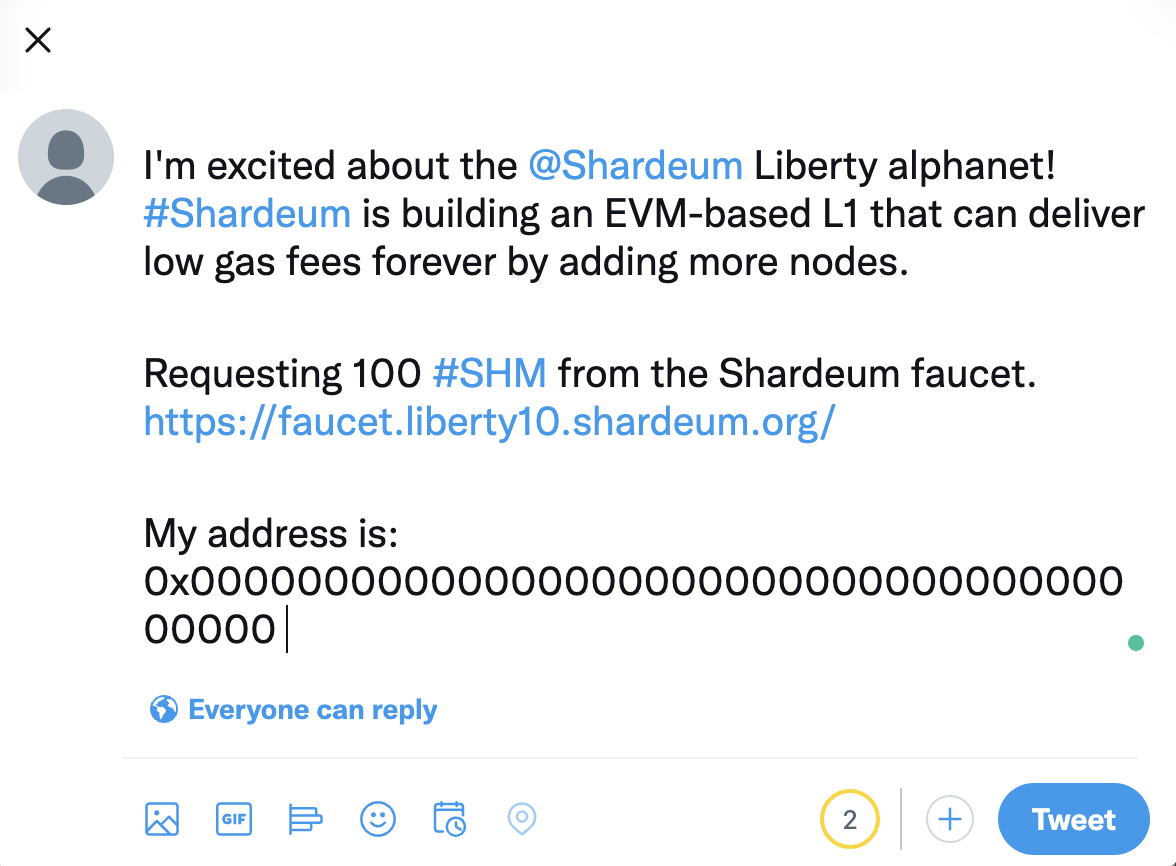
4\. Twitter will automatically open with a pre-populated tweet. Replace the blank address: 0x0000000000000000000000000000000000000000, with your account address and post the tweet.

<figure><img src="https://1005363362-files.gitbook.io/~/files/v0/b/gitbook-x-prod.appspot.com/o/spaces%2FQqjd2AKYKqYSU7Mqeuqg%2Fuploads%2FbljQkqW3BmblQMpyu6cz%2Fimage.png?alt=media&amp;token=0a883dc7-2bb0-4cb7-a9a6-586e66181193" alt=""><figcaption></figcaption></figure>

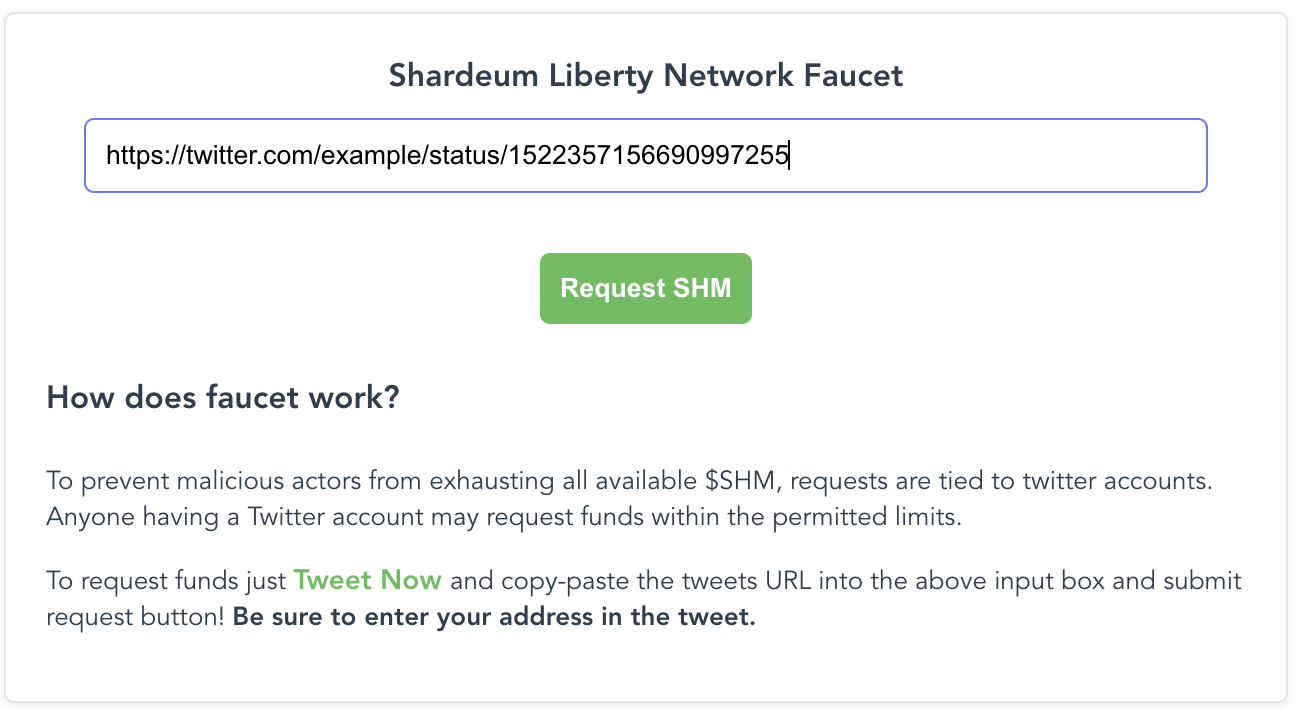
5\. Click on the tweet to visit its particular tweet URL-Copy the tweet URL-Paste the copied URL into the Shardeum Liberty faucet page and request SHM.

<figure><img src="https://1005363362-files.gitbook.io/~/files/v0/b/gitbook-x-prod.appspot.com/o/spaces%2FQqjd2AKYKqYSU7Mqeuqg%2Fuploads%2FTAIc8XoEhHTFgDrrL9ly%2Fimage.png?alt=media&amp;token=96fd0c9d-4463-4f97-9ab1-b6b645074288" alt=""><figcaption></figcaption></figure>

<figure><img src="https://1005363362-files.gitbook.io/~/files/v0/b/gitbook-x-prod.appspot.com/o/spaces%2FQqjd2AKYKqYSU7Mqeuqg%2Fuploads%2Fe9lM48oIP8C2QW3knoDX%2Fimage.png?alt=media&amp;token=f89785eb-dfc0-4eb6-bfaf-1fb367a1cfdc" alt=""><figcaption></figcaption></figure>

### Shardeum Discord Faucet

1. Join the Shardeum Discord:

   [Invitation to Shardeum Discord](https://discord.com/invite/shardeum)
2. Verify your Discord account on the Shardeum Discord server by clicking on the Shardeum emoji logo.
3. Select the Discord faucet text channel for the network you are using:

   [Liberty 1.X Faucet Text Channel](https://discord.com/channels/933959587462254612/1021737152251441244)

   [Liberty 2.X Faucet Text Channel](https://discord.com/channels/933959587462254612/1031497272191627284)
4. Submit the following text in the faucet text channel you are in (a black box with address will appear after you type /faucet):

   ```
   /faucet [address: yourMetamaskWalletAddress]
   ```

**100 SHM will be sent to your wallet after step 4.**


# EXCHANGE

<figure><img src="https://1005363362-files.gitbook.io/~/files/v0/b/gitbook-x-prod.appspot.com/o/spaces%2FQqjd2AKYKqYSU7Mqeuqg%2Fuploads%2FHoHkfm9h7eNKTtbF126J%2Fswap.jpg?alt=media&amp;token=3160417e-185a-4de1-bc59-354ee6107ae6" alt=""><figcaption></figcaption></figure>

<mark style="color:red;">**Trading on SharDex is very easy compared to most exchanges.**</mark>

SharDex provides the most concise page and the smoothest trading experience

### How to  swap？

**Step1:** &#x20;

Visit the website-Connect Wallet

<figure><img src="https://1005363362-files.gitbook.io/~/files/v0/b/gitbook-x-prod.appspot.com/o/spaces%2FQqjd2AKYKqYSU7Mqeuqg%2Fuploads%2FUviHlUS2SVYeeyX7iUuy%2Fimage.png?alt=media&amp;token=1d687bbd-5976-428d-909b-2ae9fd8cdd0d" alt=""><figcaption></figcaption></figure>

**Step2:**

Select a trading pair, such as "SHM"and ‘SDT’

<figure><img src="https://1005363362-files.gitbook.io/~/files/v0/b/gitbook-x-prod.appspot.com/o/spaces%2FQqjd2AKYKqYSU7Mqeuqg%2Fuploads%2FAE81zYvLbxQMDkRhwaVK%2Fimage.png?alt=media&amp;token=2a6ec8e6-8acf-4e82-9210-529ba1da072e" alt=""><figcaption><p>Swap</p></figcaption></figure>

**Step3:**

Enter the amount you want to swap-Click **\[Swap]**

<figure><img src="https://1005363362-files.gitbook.io/~/files/v0/b/gitbook-x-prod.appspot.com/o/spaces%2FQqjd2AKYKqYSU7Mqeuqg%2Fuploads%2FEXSwgfkx20jZzVdm692r%2Fimage.png?alt=media&amp;token=f2797255-ccad-4955-90bc-03ef757d767d" alt=""><figcaption></figcaption></figure>


# POOL

Pools are the simplest way to earn free tokens on SharDex.\
Stake SDT, earn SDT. **It’s that easy!**

<figure><img src="https://1005363362-files.gitbook.io/~/files/v0/b/gitbook-x-prod.appspot.com/o/spaces%2FQqjd2AKYKqYSU7Mqeuqg%2Fuploads%2F21E1wjQpU5MFgEAjmzeR%2Fpool.jpg?alt=media&amp;token=0b2eecb1-88dc-4edd-81c9-9a6acf45b8fa" alt=""><figcaption></figcaption></figure>

## How to Stake in  Pool

**Step 1**&#x20;

Click **\[Earn]**-**\[POOL]** to enter the pool page.&#x20;

<figure><img src="https://1005363362-files.gitbook.io/~/files/v0/b/gitbook-x-prod.appspot.com/o/spaces%2FQqjd2AKYKqYSU7Mqeuqg%2Fuploads%2FgUGRGd7GgHTUBeXfbOE8%2Fimage.png?alt=media&amp;token=c003532b-b0b1-4364-810a-498b07f5478d" alt=""><figcaption></figcaption></figure>

**Auto SDT** automatically compounds your rewards: any SDT you earn will be harvested and re-invested in the same pool for you.

**Manual SDT** does not automatically compound like Auto SDT. You’ll need to harvest and compound your earnings manually.

**Step 2**&#x20;

Click **\[Enable]** button, and fill in the amount of SDT you want to stake, or directly stake SDT according to the balance ratio.

<figure><img src="https://1005363362-files.gitbook.io/~/files/v0/b/gitbook-x-prod.appspot.com/o/spaces%2FQqjd2AKYKqYSU7Mqeuqg%2Fuploads%2Fj7ZcNGqP4oZKT8Ndxzko%2Fimage.png?alt=media&amp;token=531ccf1d-0bc5-47f8-b311-04f437b7223b" alt=""><figcaption></figcaption></figure>

Click **\[Confirm]** to confirm staking.

<figure><img src="https://1005363362-files.gitbook.io/~/files/v0/b/gitbook-x-prod.appspot.com/o/spaces%2FQqjd2AKYKqYSU7Mqeuqg%2Fuploads%2FYBUC4DuY7YodjiuYHIlr%2Fimage.png?alt=media&amp;token=e8219003-d9a2-43d7-9972-7ee458cced67" alt=""><figcaption><p>Ratio</p></figcaption></figure>

**Step3**

You can easily add more SDT to a  Pool, or move some SDT to a more profitable pool. Click the **-** to take some SDT out of a pool, or the + to add more to the pool.

<figure><img src="https://1005363362-files.gitbook.io/~/files/v0/b/gitbook-x-prod.appspot.com/o/spaces%2FQqjd2AKYKqYSU7Mqeuqg%2Fuploads%2Faqr9fhix3ZbOXQKsG8ug%2Fimage.png?alt=media&amp;token=b49d0ace-0d55-43da-81df-5db0caa7204b" alt=""><figcaption></figcaption></figure>

***Notes***

*1.Unstaking from the Auto SDT pool has some fee if you unstake within 72 hours.(But now it's still 0%)*

*2.When some pools expire, we will put them in the Finish option.*


# FARM

<figure><img src="https://1005363362-files.gitbook.io/~/files/v0/b/gitbook-x-prod.appspot.com/o/spaces%2FQqjd2AKYKqYSU7Mqeuqg%2Fuploads%2FFB1isPTaV0q1t5RF3zyI%2Ffarm.jpg?alt=media&amp;token=4742eead-54d4-4fb6-9932-87724e18efa1" alt=""><figcaption></figcaption></figure>

Farm is the **liquidity mining** function of SharDex.&#x20;

Users can add liquidity of a specific trading pair in SharDex and stake the Liquidity Provider Tokens (that is, LP Tokens) in the Farm to obtain SDT mining rewards.

You're going to need some ‘LP Tokens’ to enter into a Farm with. Farms can only accept their own exact LP Token; for example, the SDT-USDT farm will only accept SDT-USDT LP Tokens.

<figure><img src="https://1005363362-files.gitbook.io/~/files/v0/b/gitbook-x-prod.appspot.com/o/spaces%2FQqjd2AKYKqYSU7Mqeuqg%2Fuploads%2FtoVnk435T3qYSytuqaDt%2Fimage.png?alt=media&amp;token=8c3d990e-9014-4c2e-836e-448a8f6aacae" alt=""><figcaption></figcaption></figure>

To get the exact LP Token, you will need to provide liquidity for that trading pair. So to get SDT-USDT LP Tokens, you will first have to provide liquidity for the SDT-USDT pair.

It may sound intimidating, but it's easy to operate. Let's go through step by step.

**Step 1**

**Connect wallet** and then **find your farm.**&#x54;ake SDT-USDT as an example

Click \[Get SDT/USDT LP] to add liquidity&#x20;

<figure><img src="https://1005363362-files.gitbook.io/~/files/v0/b/gitbook-x-prod.appspot.com/o/spaces%2FQqjd2AKYKqYSU7Mqeuqg%2Fuploads%2FhxAj2i4f84nlbbSthUHv%2Fimage.png?alt=media&amp;token=34c8222b-2e20-44c1-85ea-e134e809e291" alt=""><figcaption></figcaption></figure>

**Step 2**

Choose SDT and USDT and Enter a specific amount to add liquidity.

<figure><img src="https://1005363362-files.gitbook.io/~/files/v0/b/gitbook-x-prod.appspot.com/o/spaces%2FQqjd2AKYKqYSU7Mqeuqg%2Fuploads%2FwYVK7wehCyuvTgPm57M5%2Fimage.png?alt=media&amp;token=9ffd4cdb-0db4-484d-b8bd-dda635429384" alt=""><figcaption></figcaption></figure>

**Step 3**

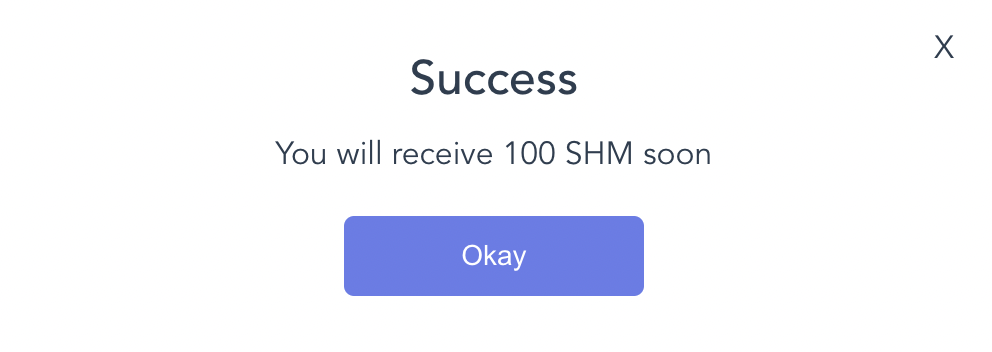
Click **\[Approve SDT]**-**\[Approve USDT]**-**\[Supply].** If it is displayed as follows, it means that the addition is successful

<figure><img src="https://1005363362-files.gitbook.io/~/files/v0/b/gitbook-x-prod.appspot.com/o/spaces%2FQqjd2AKYKqYSU7Mqeuqg%2Fuploads%2FB3Sle08KtYPav0y2rue4%2Fimage.png?alt=media&amp;token=af689957-2f75-4317-903d-65716973c520" alt=""><figcaption><p>close</p></figcaption></figure>

**Step 4**

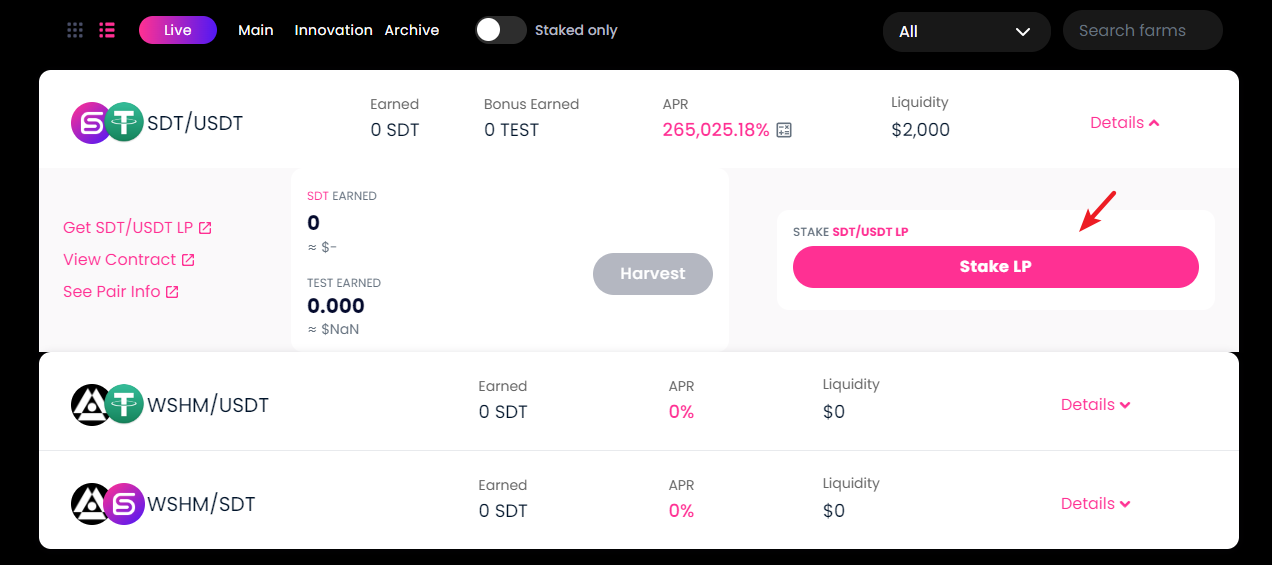
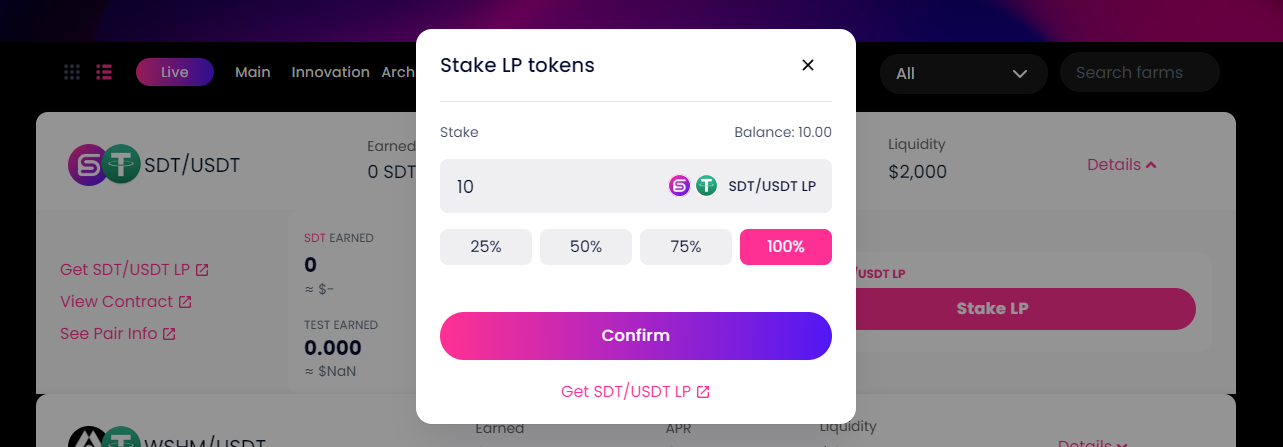
Back to farm page, Click \[**Stake LP**] to stake your SDT-USDT LP.

<figure><img src="https://1005363362-files.gitbook.io/~/files/v0/b/gitbook-x-prod.appspot.com/o/spaces%2FQqjd2AKYKqYSU7Mqeuqg%2Fuploads%2Fw2lYZ7mQxD8s23FU3TXv%2Fimage.png?alt=media&amp;token=744187fe-da68-46fd-9d6c-9ccc34d509ef" alt=""><figcaption></figcaption></figure>

<figure><img src="https://1005363362-files.gitbook.io/~/files/v0/b/gitbook-x-prod.appspot.com/o/spaces%2FQqjd2AKYKqYSU7Mqeuqg%2Fuploads%2FmZ0G1l6uz7inuHT3aoVX%2Fimage.png?alt=media&amp;token=92d96610-d140-4480-a8e1-27d12d54094b" alt=""><figcaption></figcaption></figure>

***Notes***

* *Find the farm you have LP Tokens in, and click the row to view details. You will see a - and + button. Click - to remove LP Tokens, or + to add more LP Tokens.*
* *Farming will bring you SDT rewards over time. You can collect these rewards and use them to get more LP Tokens, stake them in Pools or anything else you'd like.*
* *How often you harvest your rewards is up to you, but it does help to remember that there is a small fee involved in harvesting.*

  *You can see this fee in your wallet when confirming after clicking Harvest.*


# Bridge

Shardex also provides Cross-Chain bridge services. In the test network stage, it serves as a test faucet to provide users with test tokens for experiencing the product.

Just in case, you need to prepare some $SHM as a gas fee. :tada:Here are the [detailed steps](https://docs.shardex.org/get-start/lets-get-some-usdshm) to get SHM tokens!

:clap:**Let's experience it together!** &#x20;

1.Connect wallet--Click **\[Shardex Products]**--**\[Bridge]**

<figure><img src="https://1005363362-files.gitbook.io/~/files/v0/b/gitbook-x-prod.appspot.com/o/spaces%2FQqjd2AKYKqYSU7Mqeuqg%2Fuploads%2FlGaxQ0FfO1pNp164gkyP%2Fimage.png?alt=media&amp;token=4de4c07e-e380-414d-b630-7d84244dc192" alt=""><figcaption><p>step1</p></figcaption></figure>

2.We provide test coins of five currencies for your interactive use. They are \[**ETH\BTC\USDT\USDC\SDT**].Using \[**ETH**] as an example.

<figure><img src="https://1005363362-files.gitbook.io/~/files/v0/b/gitbook-x-prod.appspot.com/o/spaces%2FQqjd2AKYKqYSU7Mqeuqg%2Fuploads%2FIQBKnI1Q0UmeR44377P8%2Fimage.png?alt=media&amp;token=ace2db74-93b9-431b-a844-3cfe015a462a" alt=""><figcaption><p>usdt</p></figcaption></figure>

3\. Select ETH--Select From **\[Goerli ]** to **\[Shardeum]**--The specific amount will be displayed in the selection box--Click the 【**MINT**】button at the bottom of the page.

<figure><img src="https://1005363362-files.gitbook.io/~/files/v0/b/gitbook-x-prod.appspot.com/o/spaces%2FQqjd2AKYKqYSU7Mqeuqg%2Fuploads%2Fpl3t5KxI09mnc0xWpQxr%2Fimage.png?alt=media&amp;token=4ed70ac0-e169-4261-b695-5ac65a8d62ce" alt=""><figcaption><p>mint</p></figcaption></figure>

4\. A specific amount of tokens can be mint each time. Please check the form for details.

<figure><img src="https://1005363362-files.gitbook.io/~/files/v0/b/gitbook-x-prod.appspot.com/o/spaces%2FQqjd2AKYKqYSU7Mqeuqg%2Fuploads%2F9nleNn7hZWf0bOVf9hGC%2Fimage.png?alt=media&amp;token=8cbf26d3-a379-47c0-9283-05e2dfc76bad" alt=""><figcaption></figcaption></figure>

*Notes*

*1.During the public test, only **SBT** holders are allowed to use the Bridge.  Please claim your SBT first.*

*2. Each address can only claim test tokens once a day.*

*3.During the trial period, the handling fee is free for a limited time.*


# Official Links

* Twitter: <https://twitter.com/ShardexOrg>
* Medium: <https://medium.com/@Shardex>
* Discord :<https://discord.gg/TWzDNx6EYR>
* Telegram: <https://t.me/Shardex_official>